Actioned by Alison
Your Secretary
Help Desk
STAY SAFE
2 QUICK WAYS TO CHECK IF THE WEBSITE YOU ARE USING IS SECURE - before you type your card details into a website, ensure that the site is secure!
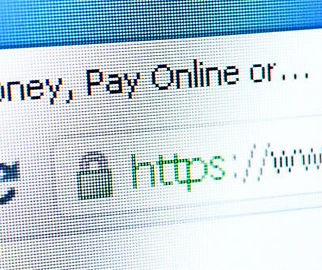
1) Look out for a small padlock symbol in the address bar (or elsewhere in your browser window) and
2) a web address beginning with https:// (the s stands for 'secure').
MORE INDEPTH
How can I tell if a web page is secured? There are two general indications of a secured web page:
1) Check the web page URL
Normally, when browsing the web, the URLs (web page addresses) begin with the letters "http". However, over a secure connection the address displayed should begin with "https" - note the "s" at the end. Note the URL sometimes begins with the "http" meaning this page is not secure, but when you "Log in" notice the change in the URL? It now begins with "https", meaning secure - if it doesn't change beware
2) Check for the "Lock" icon
There is a de facto standard among web browsers to display a "lock" icon somewhere in the window of the browser (NOT in the web page display area!). THE LOCK ICON IS NOT JUST A PICTURE! Click (or double-click) on it to see details of the site's security. This is important to know because some fraudulent web sites are built with a bar at the bottom of the web page to imitate the lock icon of your browser! Therefore it is necessary to test the functionality built into this lock icon.
SHORTCUTS
Windows Key+E
The best part about shortcut keys is letting your keyboard do half the work. This is a perfect example: This shortcut allows you to open Windows Explorer with one quick keystroke.
Windows Key+M
This is the shortcut to keep in mind when you are at work doing anything but working—it allows you to minimize all of your open windows, leaving just the desktop left exposed. To restore the windows, hit Windows key+Shift+M. Another quick way to do this is Windows key+D, which shows your desktop; to restore, just repeat the same keystroke. This is a handy shortcut to have around the next time your boss is wandering through the office.
